Ajax's Odyssey
Like the Greek hero Ajax, there are many triumphs and failures that our AJAX requests incur at Yext. Because a single AJAX call contains many diverse parts, it can be difficult to debug. While I’m no Homer, I’ll do my best to document the journey of a mythological AJAX request who has seen better days. You will doubtlessly encounter your own AJAX tragedies, and I hope that the tale I weave here will help guide your own AJAX calls to victory.
Surveying the landscape
Our adventure begins, as it so often does, with a busy sage / product manager. They point us to a URL and ask us to fix a button that appears to do nothing when clicked. Luckily, we know the general steps involved in an AJAX request, which gives us an idea of paths to we could start down.
- JavaScript listens for the button’s click event
- The event handler makes an AJAX call when the button is clicked
- The AJAX call hits an endpoint with a request and some data
- The endpoint URI routes to a backend Java method
- The Java method executes and renders a response back to the page
- The AJAX call completes a callback on the response’s success or failure
For pedagogy’s sake, we’ll begin with step one.
Hunting for JavaScript
Calling upon the powers of
Chrome Developer Tools, we open the
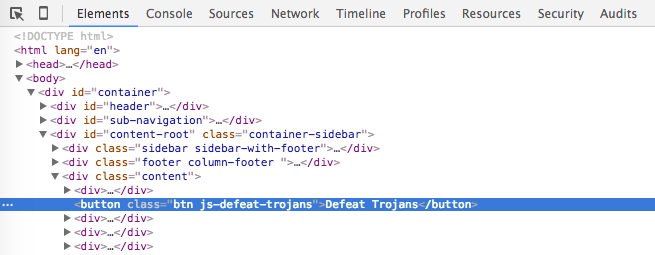
Elements tab and find our button in the DOM. Ultimately, we’re looking for
the JS file containing the event handler, so we dig for some clues that may
help us get there.
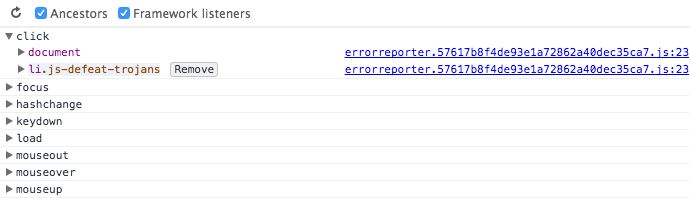
First, we check out the Event Listeners subtab. Under the click grouping,
we see some event handlers and their file origins, but the JavaScript has
been minified and concatenated into a single file. Ordinarily, we could click
on the file name and view the source code right in our Developer Tools, but
we’ll have to find another way to our file.
Fortunately, Yext has adopted the habit of prefixing all classes
selected by JavaScript with js-, so the button’s class js-defeat-trojans
is a valuable lead.
Using Sublime Text, we do a multi-file search
(⌘⇧F on Mac) for the string js-defeat-trojans. This will show us every
place it’s used in our project, which will give us important context and ensure a fix in one
place won’t cause a break in another.

It appears that the selector is used only once in our JavaScript, so we click our search results to open up the JavaScript file immediately.
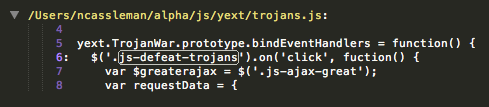
Upon initial inspection, everything looks normal in the button’s event handler.
yext.TrojanWar.bindEventHandlers = function() {
  // add event handler for button click
  $('.js-defeat-trojans').on('click', fuction() {
    var $greaterajax = $('.js-ajax-great');

    // search for HTML elements; send results with request
    var requestData = {
      hasSword: $greaterajax.find('.js-weapon').length > 0,
      hasShield: $greaterajax.find('.js-shield').length > 0,
      numTrojans: $('.js-trojan-warrior').length
    };

    // send ajax request
    $.ajax({
      dataType: 'json',
      type: 'POST',
      url: '/askoracle/defeatTrojans',
      data: requestData,
      success: function(response) {
        if (response.responseText) {
          alert(response.responseText);
        }
      },
      error: function(response) {
        if (response.errorText) {
          alert(response.errorText);
        }
      }
    });
  });
};
Since nothing looks logically incorrect, we’ll assume that there is some mismatch between the front and the back ends and begin our search into Java.
Down a twisting route
The jQuery AJAX request points to a URL that we know routes to a Java method.
Yext uses the Play! framework, and in Play!
1.x, route files follow the pattern <project>/conf/routes. Using
Sublime’s Goto Anything
feature (⌘P on Macs), we filter for trojan routes, since searching for
just routes would pull up the route file for every project.

In that file, we see that our route points to the Java method Trojan.defeatTrojans.

The land of Java
To uncover the backend, we open the Trojan class and locate its
defeatTrojans method.
public static void defeatTrojans(
  Boolean hasSpear,
  Boolean hasShield,
  Integer numTrojans) {

  JSONObject response = new JSONObject();
  String prophecy = "According the the prophecy, ";
  response.put("isDefeated", false);

  // send error if any params are missing
  if (hasSpear == null || hasShield == null || numTrojans == null) {
    prophecy = "Your gifts do not inspire a clear response."

    response.put("errorText", prophecy); // add as error text
    renderJSON(response); // render and exit early
  }

  // send prophecy based on request data
  if (hasSpear && hasShield) {
    if (numTrojans < 100) {
      response.put("isDefeated", true);
      prophecy += "the mighty Trojans will fall.";
    } else {
      prophecy += "the battle will be lost but a new day brings hope.";
    }
  } else {
    prophecy += "u ded, gg";
  }

  response.put("responseText", prophecy); // add as normal response text
  renderJSON(prophecy);
The input parameters and responses all look fine here as well. At this point, we’re feeling confused enough to start printing some log statements. There doesn’t seem to be an obvious place to add one in the Java, but perhaps our JavaScript callbacks will be more fruitful.
The long journey home
Back in our JavaScript, we add a console.log statement that prints the whole
request object.
$.ajax({
  // ...
  success: function(response) {
    console.log('Success', response);
    // if (response.responseText) {
    //   alert(response.responseText);
    // }
  },
  error: function(response) {
    console.log('Error', response);
    // if (response.errorText) {
    //   alert(response.errorText);
    // }
  }
  // ...
});
To our surprise, the console always prints success and consistently has errorText
instead of responseText. In our Java, the only time errorText is set is when a
parameter is null. Logging each parameter reveals that
hasSpear is always undefined.
We double check our request data and notice that the request data passes
hasSword instead of hasSpear. A dip into the file’s history reveals that the
property in Java was recently renamed from sword to spear, but the change was
neglected in the JavaScript.
The Network tab in Dev Tools reveals that the ‘error’ always returns
with a response of 200, so the error callback is never triggered. By using
the static variable response that is inherited by Play! controllers, we
can manually change the status to 400 for a bad request.
if (hasSpear == null || hasShield == null || numTrojans == null) {
  prophecy = "Your gifts do not inspire a clear response."

  response.status = 400;
  responseJSON.put("errorText", prophecy); // add as error text
  renderJSON(responseJSON); // render and exit early
}
Stories retold
Like any good Greek myth, the specific details and sequence of events will change with the particular storyteller. Similarly, your experiences debugging an AJAX request will vary based on your work flow and the bug you’re attempting to fix. Perhaps you are well versed with this story already, but I hope that a few tricks from this tale will find their way into your retellings.